Re Adventures Quests Guide: Story, Daily, Weekly & Infinite
Read the exact objective before entering a stage, then return to the same card to confirm progress and claim the reward.
Find the Quests menu and read one card
Open Quests from the lobby menu before you walk into Play. Paradox's September 24 recording shows five quest category tabs with Daily selected at 2:22; ItzVexo's September 23 recording also shows Daily, Infinite, Story, and Weekly categories at 0:35. The tab is a filter, not a separate place to claim every reward. Select the tab, then read the full objective on its card, its progress counter, and the reward icon or label beside it.
A phrase such as a particular act, mode, wave, or number of clears changes what counts. Write down the exact condition, especially if you are about to repeat a stage. If a card says Story, an Infinite run in the same world may not satisfy it. If it names a specific act, another act in that world may not satisfy it. This is a reading rule, not a claim that every quest has those conditions.
- In the lobby, choose Quests and open the tab that matches your plan.
- Read the action verb and target: clear, defeat, summon, reach a wave, or another condition shown by the current card.
- Check progress before starting, then revisit the same card after the run. If it is complete, press Claim if a claim control appears.
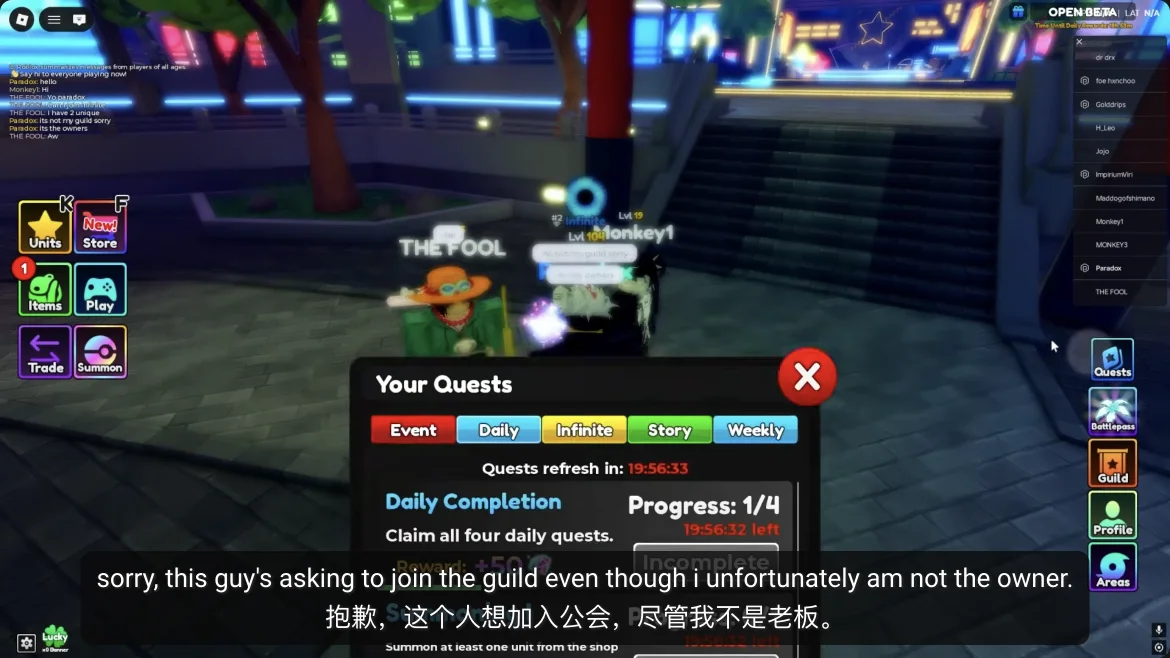
What each of the four tabs is for
The tabs shown in September footage give you a way to group your next run, but the current card determines the exact task. Story is the natural place to look for campaign progress. Daily is a short-horizon checklist; read any timer instead of assuming a server reset timezone. Weekly can contain a longer target, so check it before several runs. Infinite is relevant when you are ready to spend time in that mode rather than rushing your first Story act.
| Tab on screen | Read before you start | When to use it |
|---|---|---|
| Story | World, act, clear condition, progress and reward | Choose a campaign stage you already need to clear |
| Daily | Today's exact task, timer if shown, claim state | Pair a quick objective with your planned Story or lobby action |
| Weekly | Full target, accumulated progress, deadline if shown | Track a task over several sessions instead of forcing it today |
| Infinite | Mode and wave requirement, progress, reward | Attempt only when your squad can reach the visible target |
Turn one planned run into quest progress
Suppose your next unlocked Story act is also named by a Story quest. Check Daily and Weekly before pressing Play. If either card asks for an action that naturally occurs during that act, take the same run and check all relevant counters afterward. Do not switch to a difficult mode just because it has a separate quest tab; a reliably completed Story run is more useful than a failed Infinite attempt that advances nothing.
After a clear, compare the result screen with the quest card. A reward on the stage result screen and a reward attached to a quest are separate things. The latter may require Claim in Quests. If the counter shows progress but the card is not complete, use its remaining condition to choose the next stage. If the card already reads complete, claim it before the next session and confirm the reward in your inventory or currency display.
- Open Story, choose the available objective matching your next stage, and note its starting counter.
- Scan Daily and Weekly for overlapping tasks; do not spend scarce materials just to finish an optional card.
- Play the exact world, act, and mode named by the objective, if any.
- Return to Quests after the result screen; check the counter and claim a completed reward where the UI asks you to.
Daily rewards are useful, but read today's card
The 2:22 gameplay frame shows the Daily tab, but it does not establish a permanent payout. Published September coverage describes Gems and reroll materials as possible quest rewards. Check the reward displayed beside today's objective before you plan a summon or trait reroll around it, and verify the claimed item reached your inventory.
The same caution applies to reset time. The existence of a Daily tab does not tell us its server timezone, when a card expires in your region, or whether a missed claim carries over. Use any visible in-game countdown as the source of truth. The official Roblox experience was restricted during our September 28 check, so we could not independently confirm a current timer.
When a quest does not count
Start with the simplest mismatch. Reopen the card and compare its target to the mode and act on your result screen. Check whether the counter moved but the card needs another run, whether you claimed a completed card already, or whether the task expired before the result. Only after those checks should you assume the game failed to record progress. A screenshot of the card and result screen is more useful for a bug report than a vague statement that the quest is broken.
| Symptom | Check | Next action |
|---|---|---|
| No progress after a clear | Exact world, act, mode and task verb | Repeat only the matching activity, if you can confirm the mismatch |
| Counter moved but no reward | Completion threshold and Claim control | Finish the remaining count or claim the completed card |
| Card disappeared | Daily or Weekly timer and tab selection | Look for a refreshed card; do not assume old progress carried over |
| Reward claimed but inventory looks unchanged | Reward type and where that resource is stored | Check the matching currency or material screen once before reporting it |
Sources & further reading
Open the original pages to review dates, context, and any limitations behind this guide.
QUESTIONS / ANSWERS
Re Adventures Quests Guide: Story, Daily, Weekly & Infinite FAQ
Where are quests in Re Adventures?
Open Quests from the lobby menu. September gameplay shows Daily, Infinite, Story, and Weekly tabs; select a tab to read its current objectives and progress.
Which quest should I do first?
Choose a Story quest that matches the next act you can clear, then look for a Daily or Weekly card that can progress on the same run.
When do Daily quests reset?
We have not confirmed an official reset hour. Read any countdown in the current game menu rather than assuming a timezone.
Why did my quest not advance?
Compare the card's exact world, act, mode, and action with the run you completed. Then check the counter, completion threshold, claim state, and any timer.