Re Adventures Beginner Guide
Follow a first session from lobby to first Story clear, using dated gameplay screenshots for the menus and decisions along the way.
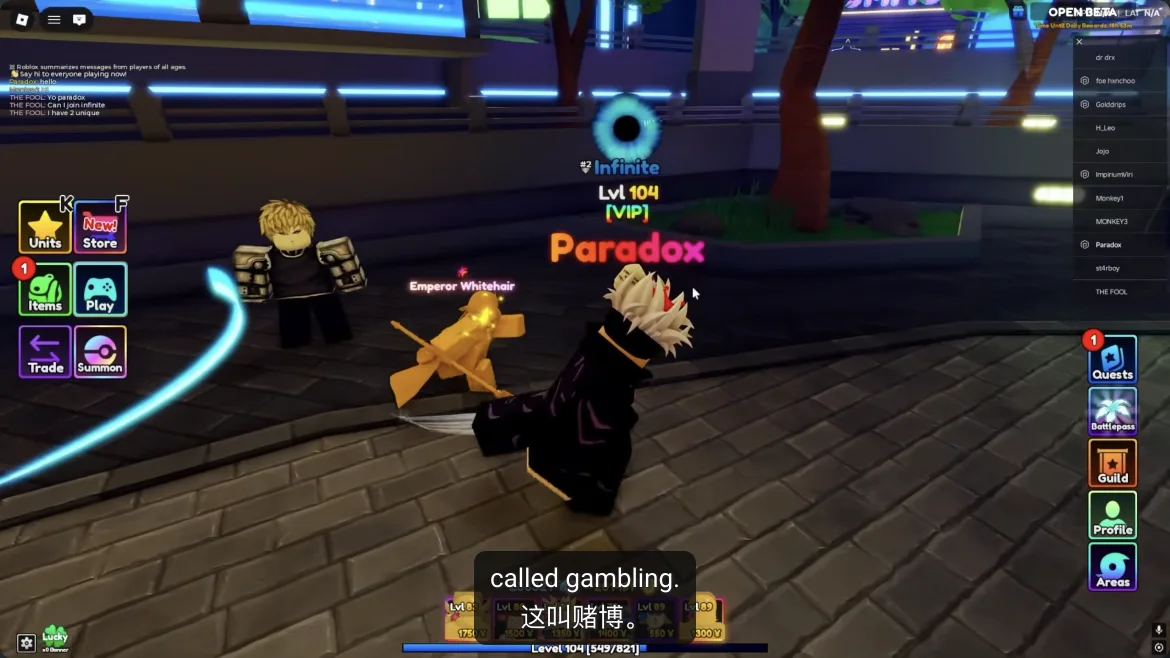
First, get your bearings in the lobby
Re://Adventures sends an equipped squad from the lobby into a tower-defense stage. Place units beside the enemy route, earn battle cash, upgrade the units stopping leaks, then return to the lobby for rewards and the next stage. Learn that loop before chasing a tier rank.
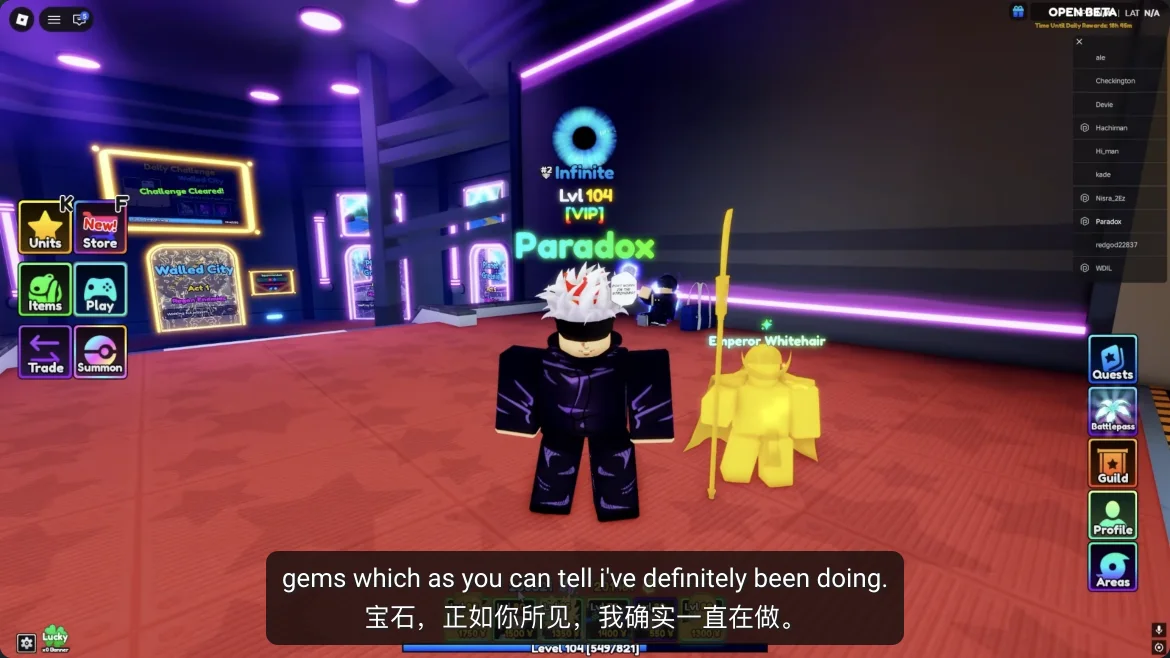
In Paradox's September 24 footage, the lobby shows Units, Play, and Quests navigation. A gameplay-linked guide places a CODES station in the spawn area. Find these before entering Play; use visible signs if a later update moves them.
- Units or Collection: inspect what you own and equip the squad for the next run.
- Quests: read Story and Daily cards before choosing a stage.
- CODES station and Play: try a reported code, then inspect worlds and modes.
- Missing a control? Check nearby signs and NPCs; the recorded lobby may differ from your build.
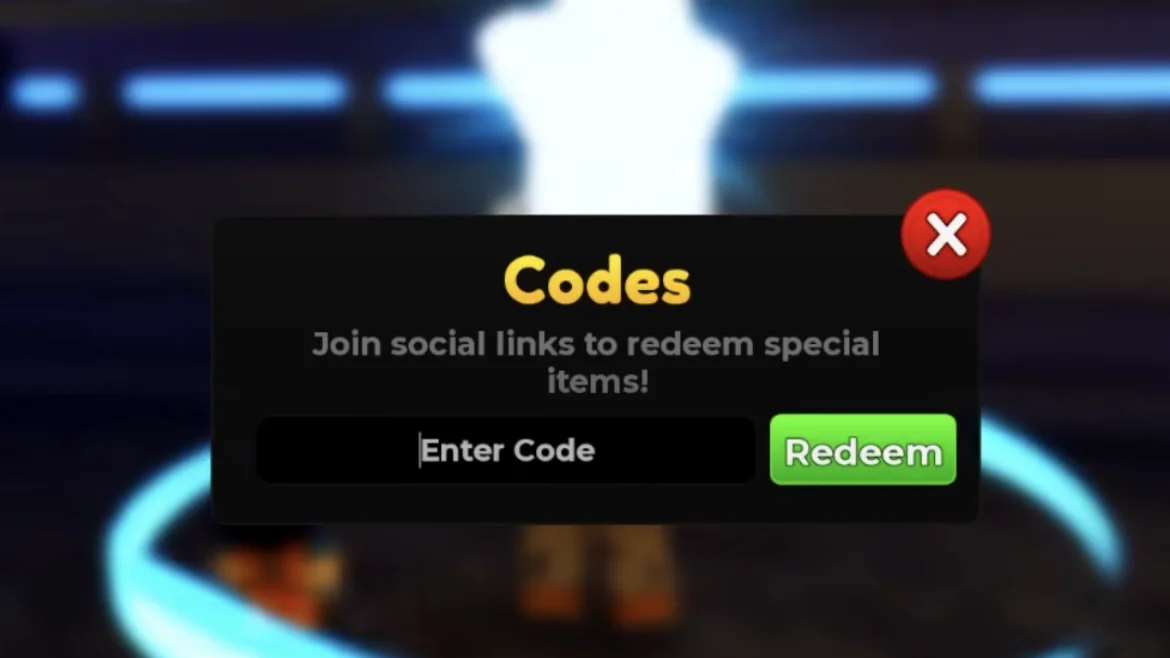
Check codes before you summon
ItsChalls' recorded gameplay shows the actual CODES station: a pink CODES sign over a bright white star and a cyan ring in the lobby. Walk into the ring to open a black Codes window with an Enter Code field and a green Redeem button. Copy a string from our dated /codes/ tracker exactly, including capitalization and punctuation. The footage proves where the entry was in that build; it does not prove a code is still valid today.
Read the game's response and check the currency or inventory if it succeeds. If it fails, move on to Story rather than guessing variants of the code.
- Enter the cyan CODES ring, open the Codes window, and paste the exact string into Enter Code.
- Press Redeem once and read the on-screen response.
- Confirm success on screen, then inspect the matching reward counter.
- If rejected, try a different reported code or continue with Story.
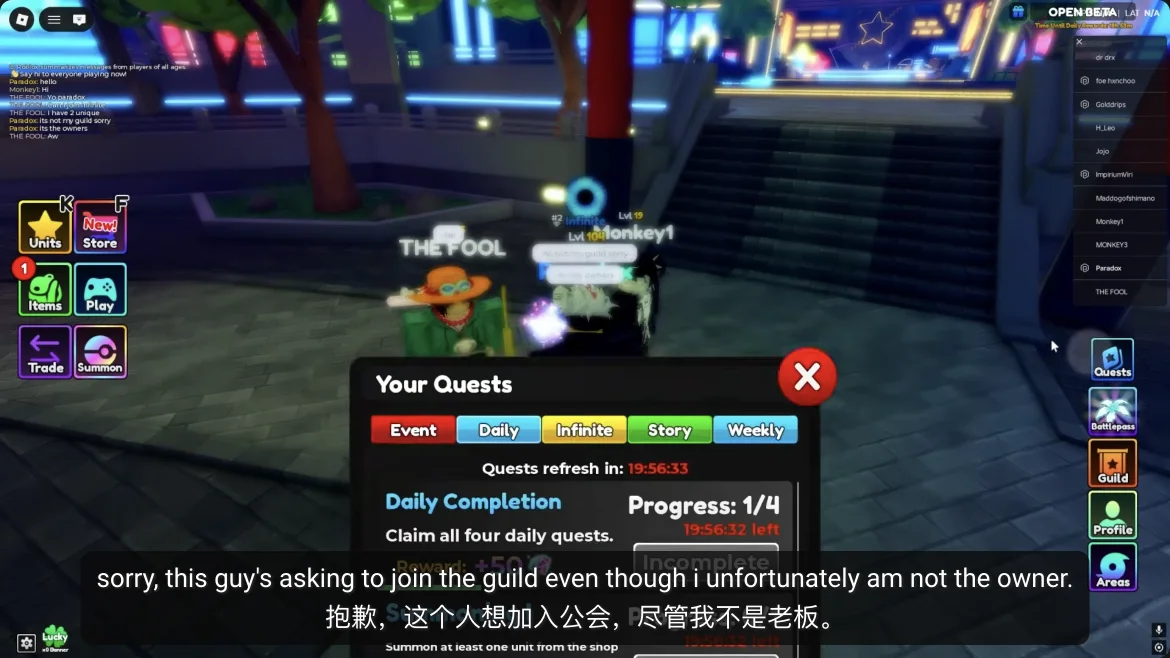
Read Quests before picking a Story stage
Open Quests and select Story. Paradox's 2:22 footage shows five quest tabs with Daily selected; another walkthrough also shows Story, Infinite, and Weekly. Read your card's exact world, act, mode, progress counter, and reward. Pick a Story objective matching a stage you can already enter.
Scan Daily for an objective that overlaps the same run. Check its counter afterward; today's reward and reset time must come from the live card. /quests/ explains the tabs and missed progress.
- Note the selected Story card's world, act, and mode condition.
- Look for an overlapping Daily or Weekly task.
- After the run, check the same counters and press Claim where required.
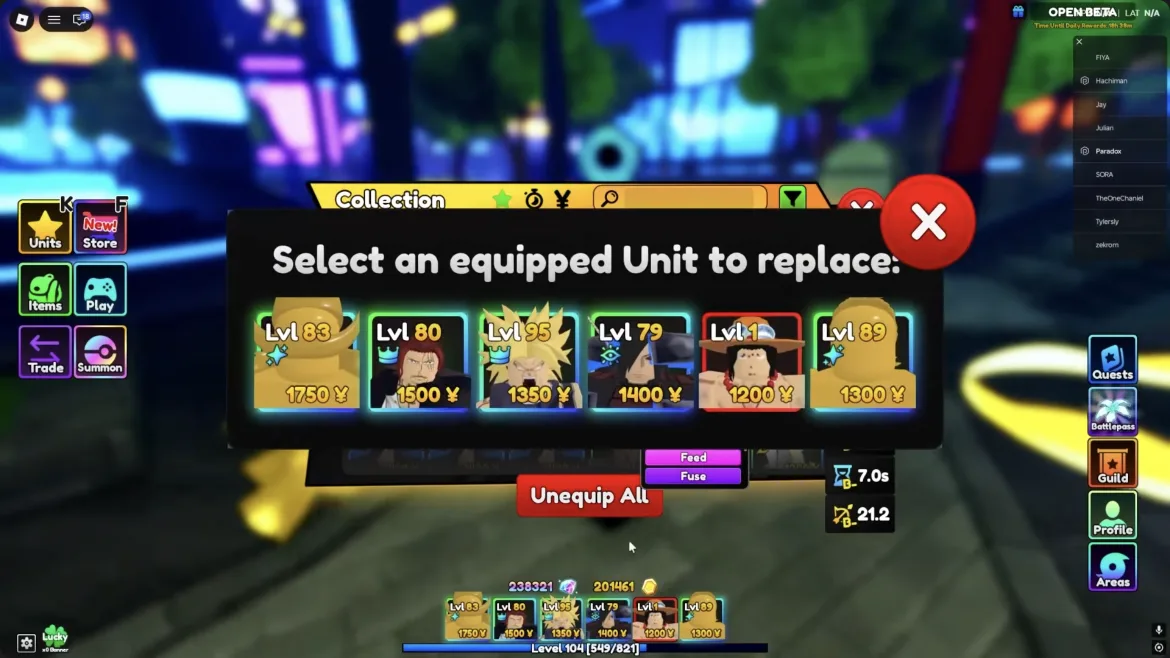
Equip a squad with three jobs
Open Units or Collection and equip the characters you intend to place; owning one does not put it in your squad. Paradox's 12:57–13:23 footage shows the collection and squad screen. Build around early damage, group coverage, and a way to handle the stage's special targets. Add a Gold unit only if the opening lane survives without its cost.
September rankings give role examples: Super Bro for Story area damage, Kyzen (Founder) for bosses and shields, Commander for physical support, Black Hair for magic support, Magma for air targets, and C.E.O. or Bulby for Gold. Use what you own. /units/ explains tradeoffs; /tier-list/ compares dated rankings.
- Start with an affordable attacker you can deploy before enemies leak.
- Add coverage for groups, bosses, or flyers as the stage reveals them.
- Match support to the carry's damage type; use a farmer when defense is stable.
- A starter squad is enough to learn the first Story route.
Enter the first available Story act
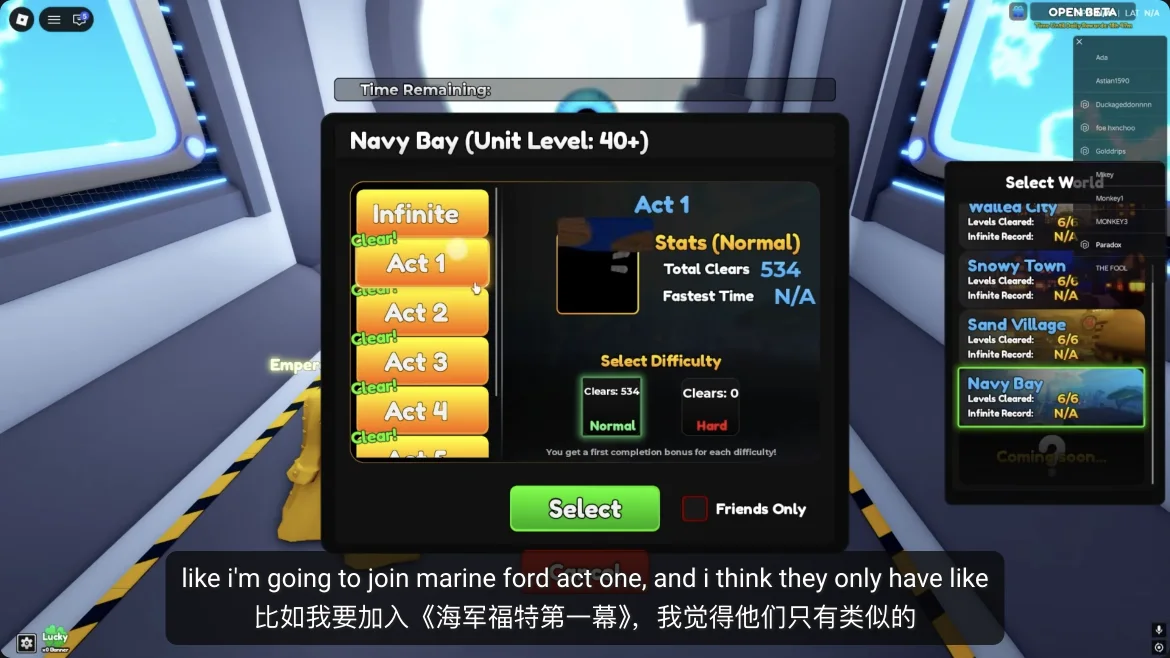
Enter Play and inspect the world picker. September coverage shows Planet Greenie open first and Navy Bay locked for a new account. Choose an unlocked world, Story mode, and an act you can enter; read any lock requirement on screen. Paradox's 6:58 Navy Bay picker illustrates the Act, difficulty, and Select controls, even if that world is still locked for you.
Match the selected world and act to your Story quest. Once loaded, trace the enemy route from entrance to exit before placing a unit.
- Compare world, mode, and act with the quest card.
- If locked, read the requirement and clear an earlier act.
- On the map, find the entrance, exit, and first long bend.
Your first waves: place, observe, then upgrade
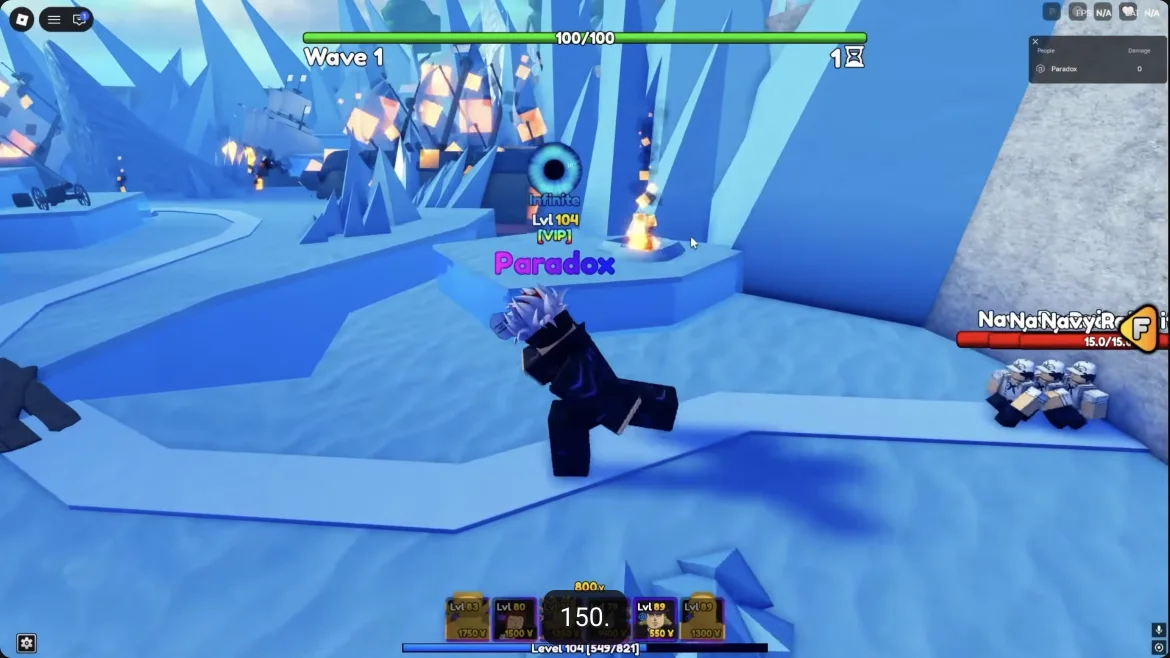
Place an affordable damage unit so its range covers a useful length of the path. A bend often gives it more time to attack, but check the actual range circle. Start the wave and watch where the first enemy survives too long. Spend battle cash on the placement or upgrade that fixes that leak before buying a farmer.
If groups escape, improve area coverage. If only a tough or shielded enemy survives, reserve damage for that target. If flyers pass while ground enemies die, add Hill or anti-air coverage next run; September guides cite Magma as one Story option. Do not scatter cash over weak placements just because a slot is open.
Use the upgrade panel to fix the current wave
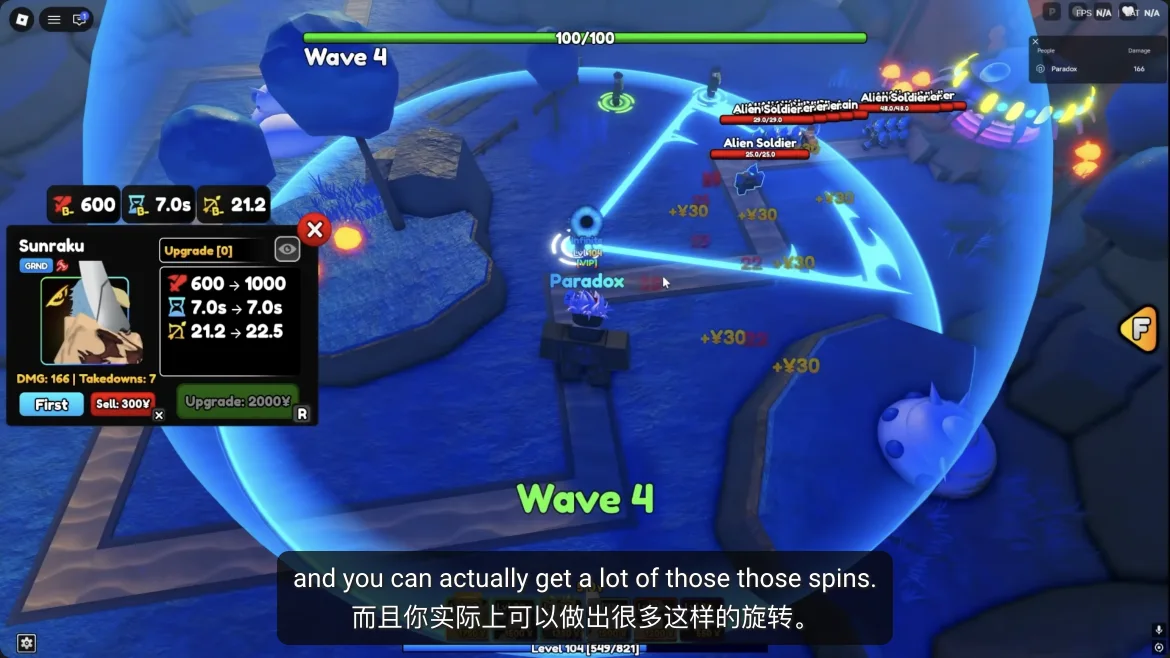
Select a placed attacker and inspect its upgrade cost and range circle. Paradox's Wave 4 footage at 13:54 shows Sunraku's panel. If that unit already kills its targets early, add coverage where enemies escape; if it almost finishes the last enemy in range, its next upgrade may be the better spend.
Watch one wave after a large purchase. Keep a wave clearer active while funding a boss answer. The screenshot's costs are from one recorded run, not a fixed build order.
If a run fails, diagnose the leak
The enemy that escaped identifies the weak point. Make one change, replay, and compare how far that enemy gets before spending Gems or reroll tokens.
| What you see | Likely issue to check | Next attempt |
|---|---|---|
| Ordinary enemies leak in the opening waves | First placement is late, too expensive, or touches too little path | Start with a cheaper damage unit and cover a longer section of route |
| A crowd survives while single enemies fall | Too little area coverage or upgrades spread too thin | Move or add area damage where enemies cluster; fund that carry first |
| Flying enemies pass your line | Your equipped attacks may not target air | Check unit targeting and bring an available Hill or anti-air option |
| Only a boss or shielded target survives | Single-target damage or shield answer is missing | Keep wave coverage, but reserve an upgrade or squad slot for the boss |
| You can defend early waves but run out of cash | Too many placements or upgrades before they pay off | Buy only the early defense needed, then test a Gold unit when safe |
After the result screen, claim what you earned
Read the result screen: note the act cleared and the reward actually awarded. Back in the lobby, reopen Quests. A completed Story, Daily, or Weekly card may need its own Claim action. Check the next act and any newly available mode or squad slot in the live UI.
The recorded Daily tab is not proof of today's payout. Check your card and inventory before planning a trait reroll. If progress did not move, compare the quest wording with the mode and act you played; /quests/ has a troubleshooting path.
- Confirm the cleared stage and actual result reward.
- Check Story, Daily, and Weekly progress; press Claim where offered.
- Inspect Collection and the next act before changing the squad.
Summon only to solve a squad gap
September guides describe Gems as summon currency. Spend them to fill a real gap: early damage, groups, flyers, support, or Gold. If your current squad clears the next act, keep progressing. Equip any new unit in Collection before testing it; ownership alone does not change the squad.
Trait rerolls replace a named trait; Stat Cubes change base stats; Press Your Luck is a lobby reward game. /reroll/ and /traits/ explain those decisions. Current costs, odds, and pity rules were not verified during the September 28 restriction.
Choose your next mode by the reward you need
After Story, inspect Area challenges for evolution materials and Infinite for repeatable rewards. The 8:20 lobby footage shows an Areas entrance; royu's September reroll video describes an Infinite spin-token route. Check current unlocks and rewards before committing to a long run.
Press Your Luck is another lobby option: September footage shows Collect and a Whammy that clears uncollected rewards. Bank a useful result before risking another round; /press-your-luck/ shows the screen. For the reported Fire Fist/Ace farm, use /how-to-get-ace/.
- Unlocks: continue the next available Story act and matching quest.
- Evolution material: inspect an available Area challenge's reward preview.
- Repeatable reward: compare Infinite's visible target with your reliable clear.
- Trait: choose a keeper unit and read the current reroll cost.
A complete first-session route
Use this short sequence for a first session. It ends with a checked result even if the first attempt fails.
- Try a dated code, read one Story quest, and equip an affordable defender with wave coverage.
- Enter an unlocked Story act; place by range and upgrade the unit solving the leak.
- Check the result and quest progress; Claim completed cards.
- If you lost, change one cause from the table and replay. If you won, pick the next act or reward route.
Sources & further reading
Open the original pages to review dates, context, and any limitations behind this guide.
- Paradox gameplay: lobby and Quests at 2:22
- Paradox gameplay: Navy Bay act selection at 6:58
- Paradox gameplay: first combat wave at 7:10
- Paradox gameplay: collection at 12:57
- Paradox gameplay: Sunraku field upgrade at 13:54
- Paradox gameplay: Press Your Luck at 2:35
- ItsChalls gameplay: CODES station and redemption window at 0:55–1:00
- royu gameplay: Infinite token route described at 0:38
- ItzVexo gameplay: Play area and worlds at 4:02
- AllThings.How beginner systems
- Pro Game Guides unit ranking
QUESTIONS / ANSWERS
Re Adventures Beginner Guide FAQ
What should I do first in Re Adventures?
In the lobby, check Codes and Quests, equip a functional squad in Collection, and enter the first unlocked Story act through Play. After the run, check quest progress and claim any completed card.
Which units should a beginner use?
Start with an affordable damage unit that stops early waves, add area or anti-air coverage for the stage, then use compatible support and economy if you own them. You do not need a specific rare unit to learn the first Story map.
Why did my first Story attempt fail?
Watch which enemy escaped. Early ordinary enemies suggest weak or late placement; groups suggest insufficient area coverage; flying enemies need a unit that can target air; a surviving boss needs a separate damage or shield answer.
Should I summon or reroll first?
Build a squad that can clear Story before spending scarce trait or stat reroll resources. Summon to fill a real team gap, then save rerolls for a unit you expect to keep.
Where should I go after Story?
Check which Story act, Area challenge, or Infinite mode is unlocked, then choose the one whose visible reward addresses your next goal. Do not assume a fixed token or drop rate from older videos.